
Choosing the best Women Laptop Bag is not only a style decision. It is a daily comfort decision.
Grand View Research identifies laptop bags as a growing accessory category, supported by hybrid work, online shopping, and mobile professionals. The Business Research Company also highlights changing work habits and rising demand for practical, durable designs. These reports suggest a useful shift: shoppers increasingly expect one bag to handle commuting, meetings, travel, and personal essentials.
Measure the laptop first.
A 13-inch computer needs different protection from a 16-inch workstation. Check the padded compartment, zipper quality, handle stitching, and shoulder-strap adjustment. A bag may look elegant on a screen but feel heavy after twenty minutes. That matters. Dr. Karen Jacobs, an occupational ergonomics specialist, advises, “The backpack should weigh no more than 10 percent of the wearer’s body weight.” Her guidance supports choosing balanced compartments and avoiding unnecessary hardware.
Materials deserve equal attention. Water-resistant fabric can protect a laptop during a sudden train-platform shower. Recycled nylon may reduce material impact, but sustainability claims require careful checking. Look for transparent product information, repair options, and credible certifications.
No checklist is perfect.
Personal routines differ. A frequent cyclist may need a weatherproof backpack, while a consultant may prefer a structured tote with discreet padding. Color, shape, and pocket placement also influence confidence and speed. In this guide, we compare protection, ergonomics, capacity, materials, security, and value. The goal is not the most fashionable Women Laptop Bag. It is the one that remains comfortable, dependable, and useful after the first impression fades.
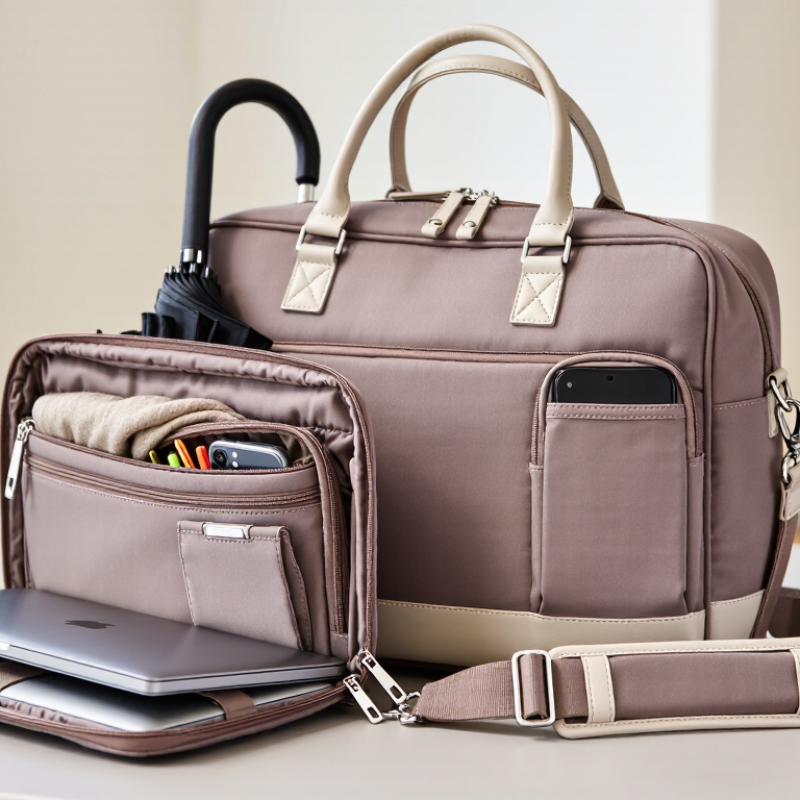
Your daily carrying needs should guide every bag decision. A stylish shape means little if your shoulder feels strained by noon. I once chose a slim bag that fitted my laptop perfectly. It failed to hold the charger, notebook, water bottle, and keys. That mistake changed how I assess bags.
Measure your laptop before shopping. Screen size describes the diagonal display, not the computer’s full length and width. Compare the device measurements with the bag’s internal sleeve dimensions. Leave a little room, but avoid excessive movement. A loose laptop can slide into corners and suffer more impact. Consider your routine, too. Commuters may need padded protection, a stable base, and comfortable handles. If you walk often, adjustable straps can distribute weight more evenly. Think beyond the workday.
Tips: Place your laptop, charger, notebook, and usual personal items on a table. Measure their combined space. Check whether the bag still closes easily. Test the handle with one hand. Notice pressure around your fingers. Inspect the stitching, zipper movement, and sleeve padding. These small details often reveal daily comfort better than photographs.
A lighter bag is not always better. Thin materials may reduce weight but offer less structure and weather resistance. I also prefer pockets that keep cables away from delicate screens. Still, too many compartments can waste space and encourage overpacking. Be honest about what you carry. My own list changes between office days, meetings, and travel, so one perfect bag may be unrealistic. Examine your habits for a week before choosing.
Compare Protection, Materials, and Weather Resistance
A reliable laptop bag should protect before it looks attractive. Check for a padded compartment with a snug fit. Extra space can let the computer slide during travel. A raised base helps when the bag rests on wet pavement. Strong zippers and reinforced stitching also matter. Small details prevent expensive damage.
Materials change the bag’s daily performance. Coated nylon is light, flexible, and usually easy to clean. Polyester can resist abrasion, but quality varies between fabrics. Full-grain leather offers structure and ages well, although it becomes heavy when wet. Neoprene padding absorbs some impact, yet it may trap heat around the device. Choose based on your commute, not appearance alone.
Weather resistance needs closer inspection. A water-resistant surface can handle light rain, but it is not waterproof. Look for sealed seams, covered zippers, and a treated exterior. Test the bag with a few drops at home. Never assume a rain cover protects every opening. I once focused too much on padding and ignored a weak zipper. That mistake changed my buying checklist. Comfort deserves equal attention: wide straps, balanced weight, and breathable contact panels reduce shoulder strain. Try the bag with your laptop, charger, notebook, and water bottle inside. An empty bag can feel perfect. Full, it may tell another story.
Choosing the best women’s laptop bag starts with its compartments, not its appearance. In my experience, a padded laptop sleeve should hold the computer firmly without forcing the zipper. Measure your laptop, including its protective case. A close fit reduces movement during travel. Check whether the sleeve has raised padding beneath the device. Small details matter.
Capacity should match your daily routine. A student may need space for notebooks, chargers, and a water bottle. A commuter may prefer a slimmer design with room for keys, a phone, and documents. Look for separate pockets instead of one deep compartment. They keep cables away from pens and prevent smaller items from disappearing. An exterior pocket can provide quick access, but it should close securely. Open pockets are convenient. They are not always reliable in crowded places.
Organization also depends on how the bag feels when carried. Test it with your usual items inside. The handles should stay comfortable, and the shoulder strap should adjust easily. I once chose a bag with excellent storage but ignored its uneven weight distribution. My shoulder noticed before I did. That mistake changed how I evaluate bags. Count the pockets, then imagine using them on a rushed morning. Some designs offer too many compartments, which can become confusing. Practical storage should save time, not create another problem.
How to Choose the Best Women Laptop Bag?
Comfort starts with the load, not the color. The World Health Organization reports that low back pain affected 619 million people in 2020. That figure is not bag-specific, but it makes weight worth measuring. Choose a padded shoulder strap, breathable back panel, and handle that does not cut into your palm. Test the bag with your actual laptop, charger, notebook, and water bottle. Walk ten minutes. Portability means balance. A slim profile helps on crowded trains, while a luggage sleeve supports longer journeys.
Security deserves practical attention. The 2025 Verizon Data Breach Investigations Report found a human element in 60% of breaches. This statistic does not measure lost laptops, yet it reinforces careful daily habits. Select strong zippers, a concealed compartment, and thick laptop padding. A water-resistant exterior also protects files during sudden rain. Still, a secure bag cannot replace device encryption, automatic locking, or personal awareness. I sometimes overvalue extra pockets; they can add weight and invite clutter.
Tips: Check the empty-bag weight before buying. Keep the heaviest item closest to your back. For professional style, choose clean lines and restrained colors that fit meetings and commuting. Avoid decorative hardware that snags easily. Try the bag with your usual clothing. A polished design may still feel awkward after an hour, and that small discomfort is easy to underestimate.
Compare the four essential criteria: comfort, portability, security, and professional style. Each category is scored from 1 to 10 using practical, observable features.
A higher score indicates stronger performance. Comfort considers padded straps and back support; portability considers weight and carrying options; security considers laptop padding, closures, and water resistance; professional style considers structure, organization, and workplace suitability.
A good women’s laptop bag should protect equipment without becoming a heavy burden. I test the handle, shoulder strap, stitching, and padding with a loaded laptop. Check whether the bag stays upright beside a desk. A smooth zipper matters during crowded commutes. It should also fit a charger, notebook, phone, and water bottle without bulging. Quality is practical, not decorative.
Sustainability deserves careful attention. The Global E-waste Monitor 2024 reported 62 million tonnes of electronic waste in 2022, with only 22.3% formally recycled. A durable bag cannot solve e-waste, but it can reduce unnecessary replacement. Look for repairable straps, strong recycled or responsibly sourced materials, and lining that does not tear easily.
Ask about material composition and care instructions. “Eco-friendly” alone proves very little.
Budget decisions need honesty. The IBM Institute for Business Value’s 2022 consumer study found that 49% of respondents had paid a premium for sustainable products. Still, a higher price does not guarantee longer use. Compare cost per year, not only the checkout total. A mid-priced bag used for five years may beat a cheap bag replaced annually.
I once chose a stylish bag with weak padding; it looked excellent, but daily use exposed the mistake. Leave room for doubt. Check the measurements twice. A bag can be sustainable, attractive, and still uncomfortable.
Measure its full length, width, and thickness. Screen size only shows the diagonal display. Compare these measurements with the sleeve’s internal dimensions. Leave slight room, not excessive movement.
Your routine determines the needed capacity and protection. Commuters may need padding, stable bases, and comfortable handles. People who walk often may prefer adjustable straps. Think beyond the workday.
Place your laptop, charger, notebook, keys, and water bottle on a table. Check whether the bag closes easily. Measure twice. My own needs change between office days and travel.
Separate pockets can keep cables away from screens and pens. An exterior pocket offers quick access. Too many compartments may waste space and confuse rushed mornings. Practical storage matters more than pocket counts.
The sleeve should hold the computer firmly without forcing the zipper. Include the protective case when measuring. Raised padding beneath the laptop offers extra support. Small details matter.
Not always. Thin materials may reduce weight but provide less structure and weather resistance. A slightly heavier bag may carry equipment more securely. Lightweight is only one factor.
Fill it with your usual items before testing the handles and shoulder strap. Notice pressure around your fingers and shoulder. Check whether the weight pulls unevenly. Comfort comes first.
Examine the stitching, zipper movement, sleeve padding, and base stability. The zipper should move smoothly without catching. The bag should remain balanced when packed. I once ignored this and regretted it.
Choosing the right Women Laptop Bag starts with understanding your daily routine and laptop dimensions. Consider how often you commute, what else you carry, and whether you need space for documents, chargers, personal items, or accessories. The bag should provide reliable padding and a snug laptop compartment, while durable, weather-resistant materials can offer extra protection from everyday moisture and wear. Check the stitching, zippers, and overall construction to ensure the bag can handle regular use.
Organization and comfort are equally important. Multiple compartments, pockets, and easy-access sections can keep your belongings neat, while padded handles, adjustable straps, and balanced weight distribution make carrying more comfortable. Security features, portability, and a polished professional appearance should also match your lifestyle and workplace. Finally, compare quality, sustainability, and price rather than choosing based on cost alone. A well-made Women Laptop Bag that meets your practical needs can provide better long-term value and reduce the need for frequent replacement.
